ThSelectPage 列表选择弹窗
孙强 2022/1/17 vue
# ThSelectPage列表选择弹窗
列表选择弹窗 支持v-model的方式控制组件的显示隐藏,支持多选/单选模式,支持自定义筛选条件,支持分页记忆选中状态,支持默认选中数据,支持设置不可选中数据
# 依赖说明
该组件依赖 element-ui,axios
# 基本使用
<th-select-page v-model="dialogs"
                title="选择用户"
                url="/api/op-biz/user/page"
                :filters="{custId:filters.custId}"
                :query-param="bindParam"
                :col-data="{nickName:'姓名',phone:'手机号',deptName:'所属部门'}"
                multiple
                row-key="id"
                :default-data="bindUsers"
                @revice="reviceUser"
                @reset="bindParam = {}"
                >
    <el-input slot="param" v-model="bindParam.nickName" placeholder="请输入姓名" clearable size="small" />
</th-select-page>
data () {
  return {
    dialogs: false,
    bindParam: {},
    bindDeptId: '',
    bindUsers: []
  }
},
method:{
    bind(){
        this.bindUsers = bindUsers
    	this.dialogs = true
    },
    reviceUser(rows){
        console.log(`选择了${rows.length}条数据`)
    }
}
# 效果演示
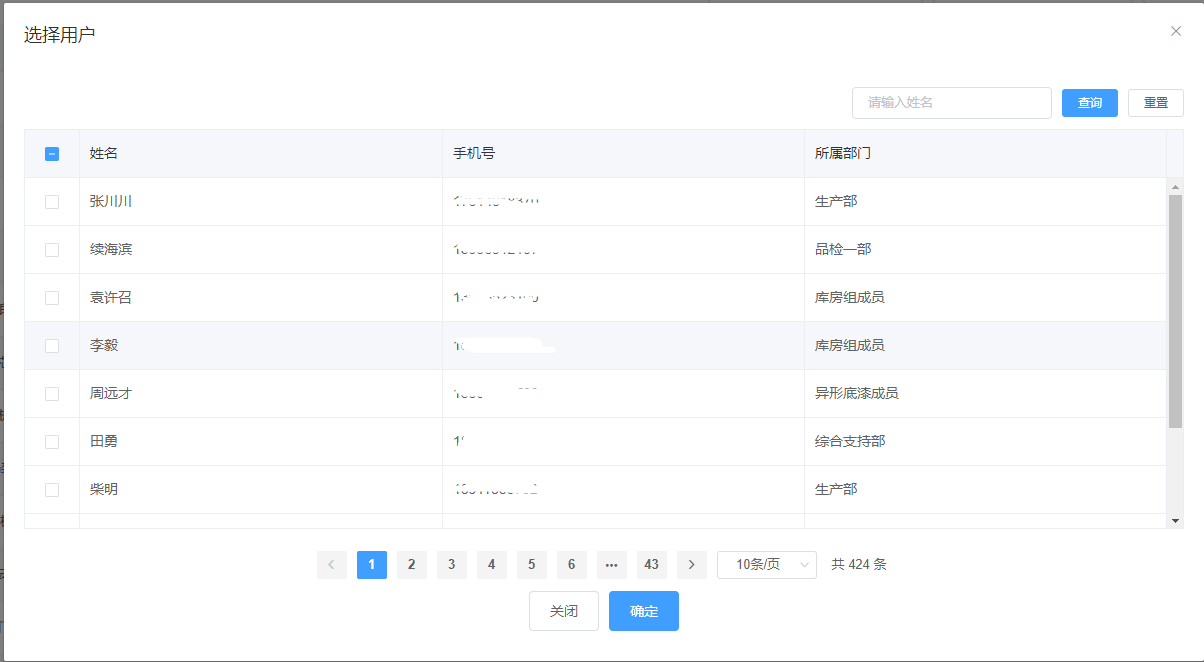
# Api
| 参数 | 说明 | 类型 | 默认值 | 可选值 |
|---|---|---|---|---|
| url | url 接口请求地址 | String | -- | -- |
| showModel | 展示/隐藏,建议使用v-model控制 | Boolean | false | true |
| colData | 数据表规则,对象类型,示例:{nickName:'姓名',accountPhone:'手机号',deptName:'所属部门'} | Object | {} | -- |
| filters | 筛选参数,点击重置时不会清空 | Object | {} | -- |
| queryParam | 筛选参数,点击重置时会清空 | Object | {} | -- |
| multiple | 是否开启多选,默认为false | Boolean | false | true |
| appendToBody | 拼接到body中,默认为false | Boolean | false | true |
| rowKey | 列表数据唯一标识,多选时必填 | String | -- | -- |
| defaultData | 默认选中数据,不必填 | Array | [] | -- |
| disableData | 不可选中数据,不必填 | Array | [] | -- |
| revice | 选中数据提交 | method | ||
| reset | 清空筛选数据 | method |