ThSearch高级搜索
吴少文 2022/4/2 vue
# ThSearch高级搜索
高级自定义方案搜索
# 依赖说明
- ThListMixin混入文件
- element-ui版本 > 2.15.7
# 要求
- 需要有数据字典 SEARCH_COMPONENT 搜索组件类型存在,支持组件类型
- 更新本地components_use.js对element-ui(2.15.7)的初始化(已同步)
- 更新本地ThListMixin.js文件 增加了对高级搜索事件的处理(已同步)
# 步骤
- 在admin系统中对菜单(系统管理->系统工具->预设高级搜索)配置服务、url、数据库表名及条件预设进行配置
- 在页面中加入th-search组件
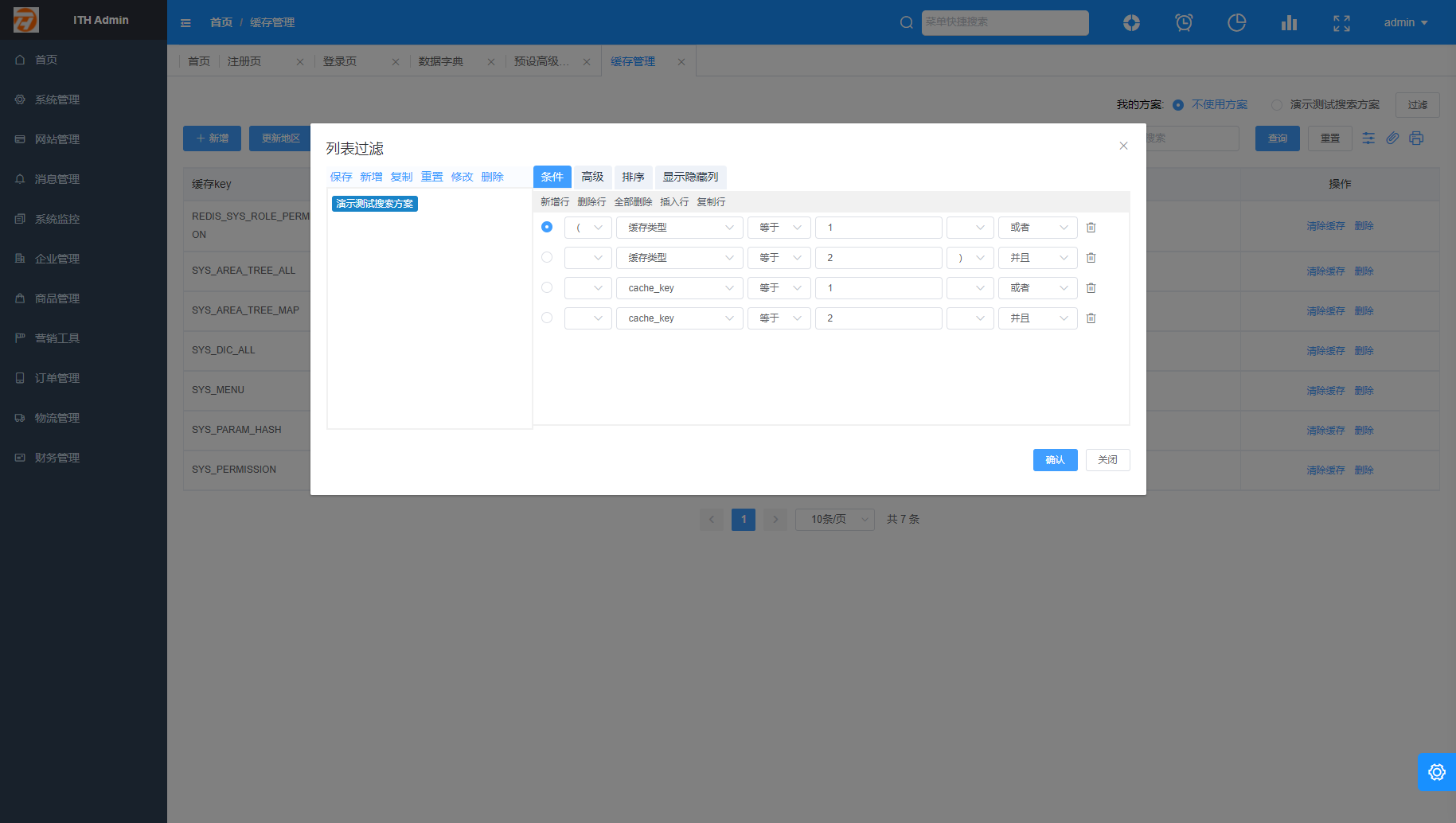
# 效果预览
# 基本使用
<template>
  <div>
    <th-search
      ref="refSearch"
      v-model="queryParam.searchSchemeId"
      :page-url="url.list"
      @change="ipagination.current = 1; loadData()"
      @select="selectEvent"
      @searchColumnChange="searchColumnChange"
    />

    <el-table
        v-loading="listLoading"
        :data="dataSource"
        border
        fit
        highlight-current-row
        header-row-class-name="base-table-header"
    >
      <template v-for="(v, i) in colData">
        <template v-if="v.istrue">
          <el-table-column v-if="v.prop === 'cacheType'" :key="v.prop + i" :prop="v.prop" :label="v.title" :width="v.width">
            <template v-slot="{row}">{{ row.cacheType }}</template>
          </el-table-column>

          <el-table-column v-else :key="v.prop + i" :prop="v.prop" :label="v.title" :width="v.width" />
        </template>
      </template>
      <el-table-column fixed="right" width="250px" align="center" label="操作">
        <template #default="scope">
          <el-button type="text">编辑</el-button>
          <el-button type="text">删除</el-button>
        </template>
      </el-table-column>
    </el-table>

    <el-button @click="saveBtn">选择好了</el-button>
  </div>
</template>

<script>
import { thListMixin } from '@/mixins/ThListMixin'

export default {
  mixins: [thListMixin],
  data () {
    return {
      url: {
        list: '/api/dwdwa/aaaaa'
      },
      // 注意: 类型不在是对象,为数组
      colData: [],
      // 用于搜索框中dialog类型缓存位置数据的
      searchCache: {}
    }
  },
  methods: {
    selectEvent (data) {
      this.searchCache = data
    },
    // 假设此函数为选中模态确定
    saveBtn () {
      // 组装数据后给对应位置回填
     /* this.searchCache.value = '选中的值'
      this.$refs.refSearch.selectBack(this.searchCache)

      const backData = { ...this.searchCache, value: '选中的值' }
      this.$refs.refSearch.selectBack(backData)*/

      this.$refs.refSearch.selectBack({ ...this.searchCache, value: '选中的值' })
    }
  }
}
</script>
# Attributes
| 参数 | 说明 | 类型 | 默认值 | 可选值 | 是否必填 |
|---|---|---|---|---|---|
| value | v-model | 绑定值 | Number(因后台字段为int类型) | -- | -- |
| pageUrl | 当前页面的分页接口地址 | String | -- | -- | 是 |
| radioType | 单选显示样式 | String | radio | radio/radioButton | -- |
| prefix | 选择方案前缀 | String | 我的方案: | -- | -- |
| dialogTitle | 配置过滤弹框标题 | String | 列表过滤 | -- | -- |
| dialogWidth | 配置过滤弹框宽度 | String | 1050px | -- | -- |
# Events
| 事件名称 | 说明 | 回调参数 |
|---|---|---|
| change | 当绑定值变化时触发的事件(当绑定值对应的配置变化时也会触发),修改查询条件后应该更改查询页码为第1页 | 更新后的值 |
| select | 配置中选择点击触发的事件(组件类型为dialog会使用) | 当前选择按钮位置的参数,不可改变此数据,直接缓存在data中即可,在调用(selectBack)时回填使用 |
| searchColumnChange | 当前方案触发或改变时,返回方案对应列的数据(更新ThListMixin.js为最新文件后即可免配置) | 对应列的数据 |
# Slots
| name | 说明 |
|---|---|
| prefix | 选择方案前缀 |
# Methods
| 方法名 | 说明 | 参数 |
|---|---|---|
| selectBack | 回填方案中选择(select)的值 | 组装select返回的数据,增加value(选择中的值)字段, 如果值为多个,使用英文逗号拼接 |