ThCrud面向配置的增删改查表格组件
吴少文 2023/3/24 vue
# ThCrud面向配置的增删改查表格组件
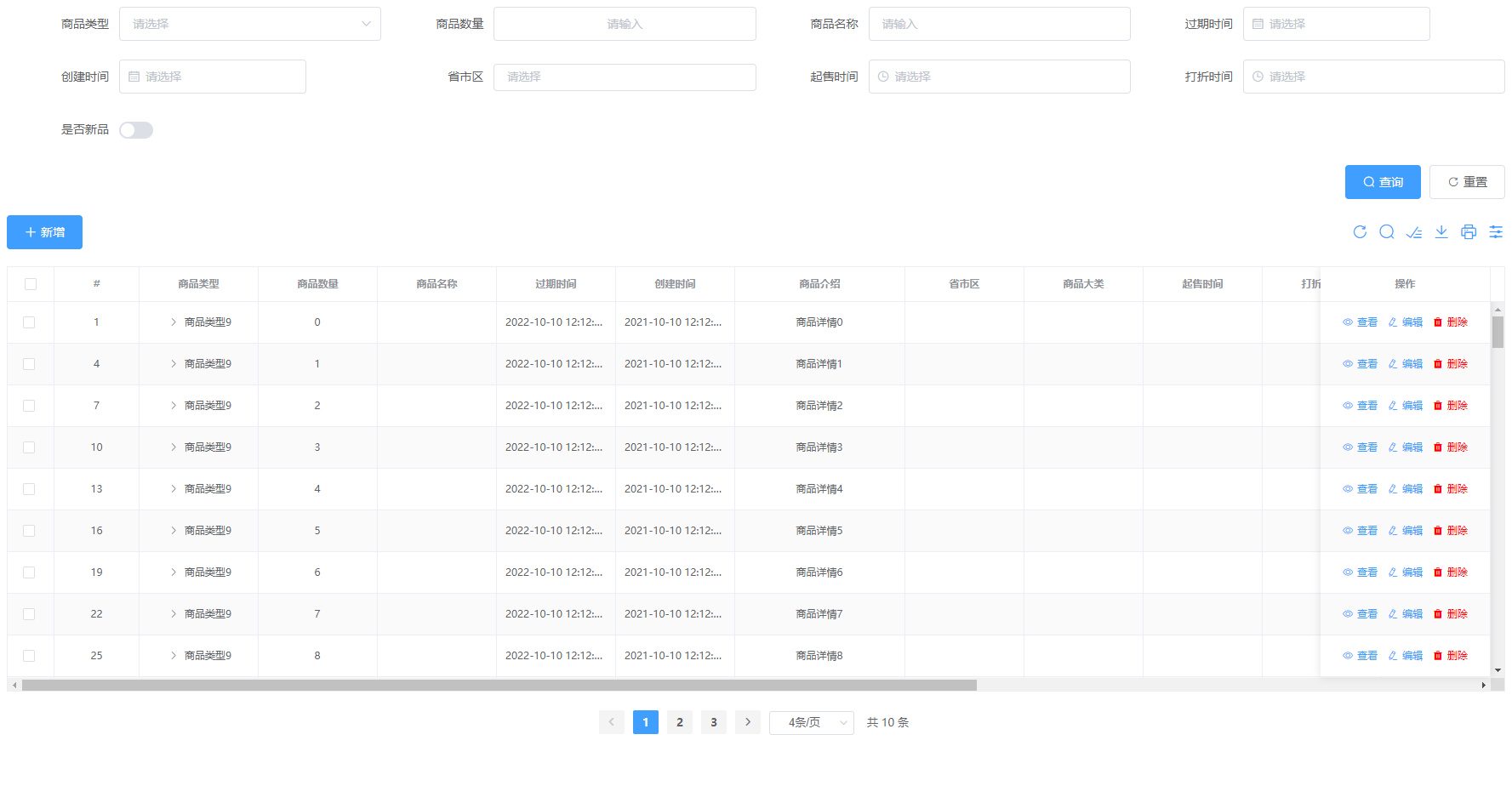
ThCrud 是一套基于 element-ui及ith-view-ui 的增强型表格组件,面向配置开发,快速搭建具备 增、删、改、查 功能的表格页面
# 产品特点
- 面向配置的开发模式,且提供了不同维度的配置,开发简单快速,省去大量业务代码
- 支持 vxe-table,及大数据量渲染、大数据量树形数据等
- element-ui和ith-view-ui 的form组件支持(21+)
- 支持本地和远程的数据字典,且自动缓存
- 扩展的多选模式,支持异步跨页数据多选,支持批量删除数据
- 支持导出表格数据,支持打印表格,支持调整固定列顺序、列显/隐等功能
# 基本使用
<th-crud
  :vxe-table="true"
  :data="data"
  :columns="columns"
  :table-options="tableOptions"
  :page-options="pageOptions"
  :fetch-data="fetchData"
  :fetch-create="fetchCreate"
  :fetch-edit="fetchEdit"
  :fetch-remove="fetchRemove"
  :fetch-batch-remove="fetchBatchRemove"
/>
//js
export default {
  data () {
    return {
      tableOptions: {
        maxHeight: '500px',
        rowKey: 'productId',
        headerRowClassName: 'base-table-header',
      },
      pageOptions: {
        total: 0,
        current: 1,
        pageSize: 10,
        style: 'text-align: center;'
      },
      data: [],
      columns: [
        {
          label: '名字',
          prop: 'name',
          width: 200,
          componentName: 'input',
        },
        {
          label: '年龄',
          prop: 'age',
          width: 200,
          componentName: 'inputNumber',
          componentOption: {
            min: 0,
            max: 1000,
            step: 1,
            stepStrictly: true,
            controls: false
          }
        },
      ]
    }
  },
  methods: {
    fetchData ({ current, pageSize, search }) {
      return new Promise(resolve => {
        // 调用接口
        setTimeout(() => {
          this.data = []
          resolve()
        }, 600)
      })
    },
    fetchCreate (params) {
      return new Promise(resolve => {
        // 调用接口
        setTimeout(() => {
          this.$message.success('新增成功!')
          resolve()
        }, 600)
      })
    },
    fetchEdit (params) {
      return new Promise(resolve => {
        // 调用接口
        setTimeout(() => {
          this.$message.success('编辑成功!')
          resolve()
        }, 1200)
      })
    },
    fetchRemove (params) {
      return new Promise(resolve => {
        // 调用接口
        setTimeout(() => {
          this.$message.success('删除成功!')
          resolve()
        }, 600)
      })
    },
    fetchBatchRemove (params) {
      return new Promise(resolve => {
        // 调用接口
        setTimeout(() => {
          this.$message.success('批量删除成功!')
          resolve()
        }, 600)
      })
    }
  }
}
# 效果演示
# Attributes
| 参数 | 说明 | 类型 | 默认值 | 可选值 |
|---|---|---|---|---|
| vxeTable | 使用vxe-table大数据渲染表格 | boolean | false | -- |
| data | 显示的数据 | array | -- | -- |
| columns | 列的配置查看配置 | array | -- | -- |
| toolsOptions | 工具栏配置查看配置 | object | -- | -- |
| tableOptions | table配置查看配置 | object | -- | -- |
| pageOptions | 分页配置查看配置 | object | -- | -- |
| viewFormOptions | 详情配置查看配置 | object | -- | -- |
| editFormOptions | 编辑配置查看配置 | object | -- | -- |
| fetchData | 查询回调 | function({ current, pageSize, search }) | -- | -- |
| fetchCreate | 新增回调 | function(params) | -- | -- |
| fetchEdit | 编辑回调 | function(params) | -- | -- |
| fetchRemove | 删除回调 | function(params) | -- | -- |
| fetchBatchRemove | 批量删除回调 | function(params) | -- | -- |
# toolsOptions 工具类配置
| 参数 | 说明 | 类型 | 默认值 | 可选值 |
|---|---|---|---|---|
| items | 包含的功能 | array | ['refresh', 'search', 'size', 'filter', 'export', 'print'] | ['refresh', 'search', 'size', 'filter', 'export', 'print'] |
| exportFileName | 导出文件的名称 | string | 数据源 | -- |
# pageOptions 分页配置
| 参数 | 说明 | 类型 | 默认值 | 可选值 |
|---|---|---|---|---|
| 支持th-pagination属性 | 跳转 (opens new window) | -- | -- | -- |
| total | 总条数 | number | 0 | -- |
| current | 当前页 | number | 1 | -- |
| pageSize | 每页显示条目个数 | number | 10 | -- |
# viewFormOptions 分页配置
| 参数 | 说明 | 类型 | 默认值 | 可选值 |
|---|---|---|---|---|
| type | 弹框类型 | string | modal | modal/drawer |
| modalOptions | 模态框配置,支持el-dialog部分配置 (opens new window) | object | -- | -- |
| drawerOptions | 模态框配置,支持el-dialog部分配置 (opens new window) | object | -- | -- |
# editFormOptions 分页配置
| 参数 | 说明 | 类型 | 默认值 | 可选值 |
|---|---|---|---|---|
| type | 弹框类型 | string | modal | modal/drawer |
| modalOptions | 模态框配置,支持el-dialog部分配置 (opens new window) | object | -- | -- |
| drawerOptions | 模态框配置,支持el-dialog部分配置 (opens new window) | object | -- | -- |
# tableOptions 表格配置
| 参数 | 说明 | 类型 | 默认值 | 可选值 |
|---|---|---|---|---|
| height | 表格的高度 | string/number | -- | -- |
| maxHeight | 表格的最大高度 | string/number | -- | -- |
| stripe | 是否为斑马纹 table | boolean | true | -- |
| border | 是否带有纵向边框 | boolean | true | -- |
| fit | 列的宽度是否自撑开 | boolean | true | -- |
| showHeader | 是否显示表头 | boolean | true | -- |
| highlightCurrentRow | 是否要高亮当前行 | boolean | true | -- |
| headerRowClassName | 表头行的 className | string | -- | -- |
| rowKey | 行数据的 Key,用来优化 Table 的渲染;在使用 reserve-selection 功能与显示树形数据时,该属性是必填的 | string | -- | -- |
| emptyText | 空数据时显示的文本内容 | string | 暂无数据 | -- |
| tooltipEffect | tooltip effect 属性 | string | light | dark/light |
| showCheckbox | 是否显示多选框 | boolean | true | -- |
| showIndex | 是否显示序号列 | boolean | true | -- |
| indexText | 序号文本 | string | 序号 | -- |
| indexWidth | 序号列宽度 | string/number | 50px | -- |
| showTree | 是否为树形结构 | boolean | false | -- |
| treeChildrenName | 树形结构children对应属性名 | string | children | -- |
| virtualTree | 是否开启虚拟树,开启虚拟树,数据格式将不在是嵌套,所有数据在同一级,只需要给数据一个父级的id即可自动生成(vxe-table开启) | boolean | false | -- |
| virtualTreeParentId | 开启虚拟树时,父级id字段名(vxe-table开启) | string | parentId | -- |
# columns 列配置
| 参数 | 说明 | 类型 | 默认值 | 可选值 |
|---|---|---|---|---|
| label | 显示的标题 | string | -- | -- |
| prop | 对应列内容的字段名 | string | -- | -- |
| width | 对应列的宽度 | string | -- | -- |
| show | 是否显示 | boolean | true | -- |
| componentName | 组件名 | string | -- | -- |
| componentOption | 组件属性配置,不同组件不同配置,style class等html属性可通用 | object | -- | -- |
| search | 搜索框配置. show为false时不会出现在搜索栏中; componentName组件名称未配置将使用外层的; componentOption组件属性配置,未配置将使用外层的 | object | -- | {show, componentName,componentOption} |
| form | form表单配置. prop字段; componentName组件名称未配置将使用外层的; componentOption组件属性配置,未配置将使用外层的; 布局grid:{span: 默认12}参考el-col配置; rules验证规则,参考el-form-item的rules配置; | object | -- | {prop, componentName, componentOption, grid, rules} |
| addForm | form表单配置添加状态时配置. show为false时添加不显示字段仅编辑显示且为禁止操作状态; value添加时默认值 | object | -- | {show, value} |
| dict | 字典数据 data为静态数据array类型; url(string)为远程查询的数据; props:{value: 'value', label: 'label'}可自定义配置label和value属性对应字段; params(object)为远程查询时参数; | object | -- | {data, url, props, params} |
| 是否打印和导出中显示 | boolean | true | -- | |
| tooltip | 当内容过长被隐藏时显示 tooltip | boolean | true | -- |
| align | 对齐方式 | string | center | left/center/right |
| fixed | 列是否固定在左侧或者右侧 | string/boolean | false | true/left/right |
# 查询条件支持的组件(componentName)
| 组件类型 | 对应组件全名 | 组件库来源 |
|---|---|---|
| input | el-input | element-ui (opens new window) |
| inputNumber | el-input-number | element-ui (opens new window) |
| select | el-select | element-ui (opens new window) |
| cascader | el-cascader | element-ui (opens new window) |
| switch | el-switch | element-ui (opens new window) |
| slider | el-slider | element-ui (opens new window) |
| timeSelect | el-time-select | element-ui (opens new window) |
| timePicker | el-time-picker | element-ui (opens new window) |
| datePicker | el-date-picker | element-ui (opens new window) |
| radio | el-radio | element-ui (opens new window) |
| checkbox | el-checkbox | element-ui (opens new window) |
| region | th-region | ith-view-ui (opens new window) |